Speedup Your Contribute to Opensource
Today I will share a fast way to develop code and make contribute to opensource, the keyword is Codespace from github’s beta product.
for more detail about
Codespaceplease check official doc.
Abstract
- find out your target opensource
- prepare develop container image
- start code online & make contribute
The Real Story
Our Target
Manim is a powerful program implemented by Python to make animation, and most cases to make explanatory math videos.
I would like to make a dynamic bars video to visualize the number of people with Covid-19 group by country, that will be friendly to show the change what we have experienced now.
Folk it to my github account: https://github.com/distpub/manim
Develop Container Image
I am a fresh to manim, so I read the manim official docs to learning how to setup the environment. It looks like very frequently python program.
Let’s checkout a new branch named codespace to prepare the develop container image Dockerfile. I strongly recommend to use vscode team image as the parent image, because they already integrated many develop software in their image. You can find all images on docker hub: https://hub.docker.com/_/microsoft-vscode-devcontainers?tab=description
This is my Dockerfile to setup manim develop environment.
ARG VARIANT="3.6"

FROM mcr.microsoft.com/vscode/devcontainers/python:0-${VARIANT}

# [Optional] Allow the vscode user to pip install globally w/o sudo

ENV PIP_TARGET=/usr/local/pip-global

ENV PYTHONPATH=${PIP_TARGET}:${PYTHONPATH}

ENV PATH=${PIP_TARGET}/bin:${PATH}

RUN mkdir -p ${PIP_TARGET} \

&& chown vscode:root ${PIP_TARGET} \

&& echo "if [ \"\$(stat -c '%U' ${PIP_TARGET})\" != \"vscode\" ]; then chown -R vscode:root ${PIP_TARGET}; fi" \

| tee -a /root/.bashrc /home/vscode/.bashrc /root/.zshrc >> /home/vscode/.zshrc

# [Optional] Uncomment this section to install additional OS packages.

RUN apt-get update \

&& export DEBIAN_FRONTEND=noninteractive \

&& apt-get -y install --no-install-recommends sox ffmpeg libcairo2 libcairo2-dev texlive-full

# [Optional] If your pip requirements rarely change, uncomment this section to add them to the image.

COPY requirements.txt /tmp/pip-tmp/

RUN pip3 --disable-pip-version-check --no-cache-dir install -r /tmp/pip-tmp/requirements.txt \

&& rm -rf /tmp/pip-tmp
Also you can check on the github repo: https://github.com/DistPub/manim/blob/codespace/.devcontainer/Dockerfile
Then you can configure devcontainer.json to build the image on codespace setup time.
{

  "name": "CodeSpace",

  "build": {

    "dockerfile": "Dockerfile",

    "context": "..",

    // Update 'VARIANT' to pick a Python version: 3, 3.6, 3.7, 3.8

    "args": { "VARIANT": "3.6" }

  },

  // Add the IDs of extensions you want installed when the container is created.

  "extensions": [

    "ms-python.python"

  ]

}
Also you can check on the github repo: https://github.com/DistPub/manim/blob/codespace/.devcontainer/devcontainer.json
Give a try, you will find out that’s very slowly to build an image on setup time, and more worse is that image can’t be cache, which means every time you create a Codespace, you need build the image.
Let’s improve the experience, we can cache the image on docker hub by our self. This is what I did: https://hub.docker.com/r/distpub/manim-codespace
Then you just configure devcontainer.json to use the docker hub image.
{

  "name": "CodeSpace",

  "image": "distpub/manim-codespace",

  // Add the IDs of extensions you want installed when the container is created.

  "extensions": [

    "ms-python.python"

  ]

}
Also you can check on the github repo: https://github.com/DistPub/manim/blob/codespace-staging/.devcontainer/devcontainer.json
Note: I just checkout a new branchcodespace-stagingto keep the history, you can still edit on thecodespacebranch.
Coding & Contribute
Let’s create a Codespace, chose your folk repo(for me is DistPub/manim), chose the codespace branch, wait a minute, a fresh online modern develop environment power by vscode will display.
Note: default shell is
sh, you should change tobashmanually
It’s time to enjoy coding.
- git pull origin main:main
- git checkout -b feature-xxx main
- git checkout -b bugfix-xxx main
- …
It’s time to make contribute.
- git push -u origin feature-xxx
- git push -u origin bugfix-xxx
- …
Send your PR!
The Output
Create dynamic bars video:
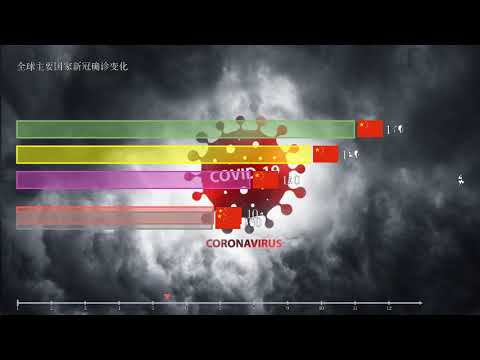
source code: https://github.com/DistPub/manim/tree/learning-demo-dynamic-bars
Note: right now the video is private, because I used youtube-upload to upload fromCodespacecontainer, more detail you can check youtube-upload official issues #306.
Note: I will keep on trying to make this video public
Note: Now, it’s public🎉
Contribute PR #1274 for improve manim background image support:
source code: https://github.com/DistPub/manim/tree/feature-background-image-size
Conclusion
As you can see, all the coding and configure action completely finished online, totally done in the browser! Even upload video to Youtube and write this article(stackedit.io).
We can see the future coding way and going right now.